How to Create a Housebets Account: Step-by-Step
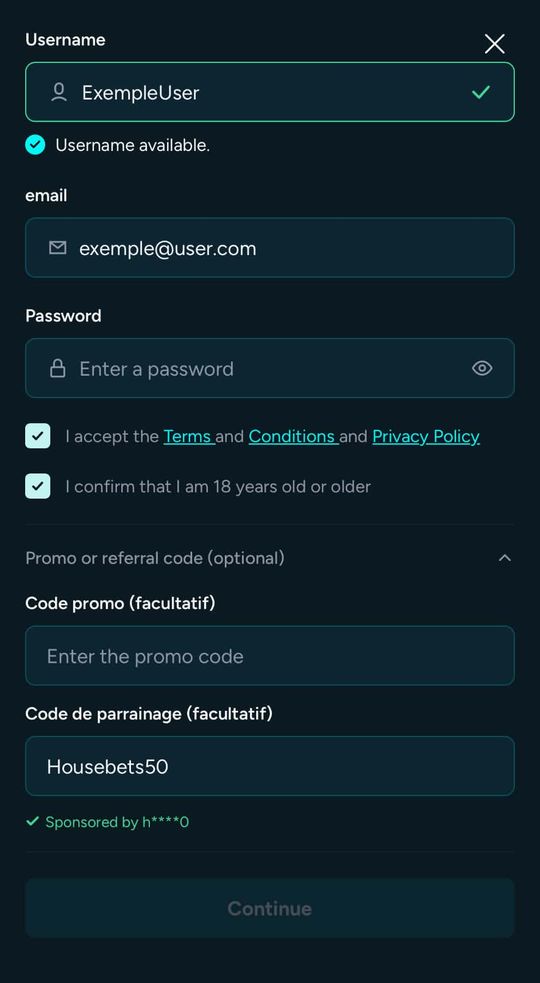
Short answerClick Register on housebets.com, choose a username, enter your email and a password, tick the terms and 18+ boxes, then open "Promo or referral code" and type BonusHB in the referral code field before clicking Continue.
Steps
- Go to housebets.com and click Register.
- Username: Housebets tells you instantly if it is available.
- Email and password: use a password you do not use anywhere else.
- Tick I accept the Terms and Conditions and Privacy Policy and I confirm that I am 18 years old or older.
- Open Promo or referral code (optional). There are two fields. Type BonusHB in the referral code field. A green “Sponsored by” line confirms it.
- Click Continue.
Next steps
- Turn on two-factor authentication: secure your account.
- Claim Wave 2.
- Make a first deposit if you want to play beyond the bonus.
The referral code usually cannot be added once you have deposited. See adding a referral code later.